How to Use QR Code Scanning to Check Guests In Like a Pro
Jul 7, 2026 · 10 min read
Money is the number one question every event organizer asks before choosing a ticketing platform. How do I get paid? When do I get paid? How much does the platform take? Can I receive money in my local currency? What if I am not in Nigeria?
Fair questions, all of them. And they deserve clear, detailed answers.
This guide explains the complete journey your money takes on TikkBay, from the moment an attendee pays for a ticket to the moment the funds land in your bank account or mobile money wallet. No surprises, no hidden fees, no confusion.
How the Money Flows
Here is what happens when someone buys a ticket to your event on TikkBay.
First, the attendee selects their tickets on your event page and proceeds to checkout. They enter their name, email, and phone number, answer any custom checkout questions you have set up, and apply a discount code if they have one.
Next, they pay. TikkBay processes the payment through one of two secure payment gateways depending on your country. The payment is confirmed instantly, and the attendee receives their ticket with a unique QR code via email.
On your end, the sale appears immediately on your organizer dashboard. Your revenue counter updates, your tickets sold count goes up, and the order shows in your recent orders feed. The money is held securely by the payment gateway until your next scheduled payout.
When your payout date arrives, TikkBay calculates your earnings for the period, deducts the platform service fee and the payment gateway transfer fee, and sends the remaining amount directly to your verified bank account or mobile money wallet.
That is the full cycle. Now let us break down each piece in detail.
14 African Countries, Local Currencies, Local Payment Methods
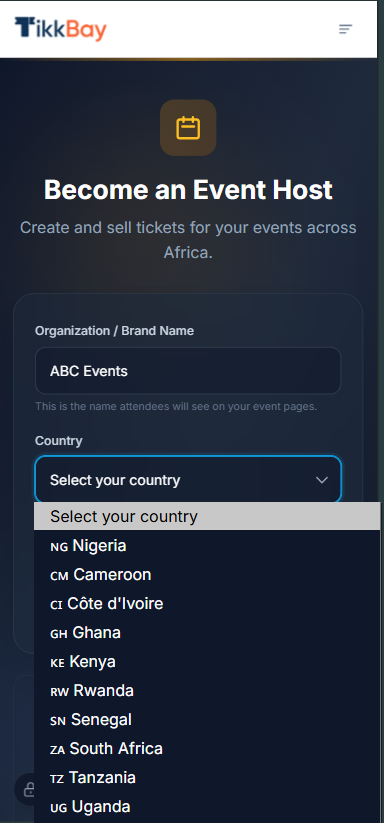
TikkBay is not just a Nigerian platform. It supports event organizers across 14 African countries, each with their own local currency and payment methods.
Nigeria uses Paystack as the primary payment gateway. Attendees can pay with card, bank transfer, or USSD. Your default currency is the Nigerian Naira (NGN) and the minimum payout amount is N1,000.
Ghana uses Flutterwave as the payment gateway. Attendees can pay with card, bank transfer, or mobile money. Your default currency is the Ghanaian Cedi (GHS) and you can receive payouts to your bank account or your mobile money wallet.
Kenya also uses Flutterwave. Attendees can pay with card, bank transfer, or M-Pesa. Your default currency is the Kenyan Shilling (KES) and mobile money payouts via M-Pesa are supported.
The same pattern applies to Uganda, Tanzania, South Africa, Rwanda, Zambia, Cameroon, Senegal, Egypt, Malawi, and Sierra Leone. Each country is configured with the correct currency, payment methods, and payout options for that market.
Out of the 14 countries, 11 support mobile money for both payments and payouts. The exceptions are Nigeria, South Africa, and Egypt, where bank transfers are the primary method.
When you create your organizer account and select your country, TikkBay automatically sets your default currency, assigns the correct payment gateway, and configures the right payment methods. You do not need to set any of this up manually.
Understanding the Service Fee
TikkBay charges a service fee on each paid ticket sold. This fee covers payment processing, platform infrastructure, ticket delivery, QR code generation, email reminders, and all the tools you use as an organizer.
For Nigerian (NGN) transactions, the fee is a percentage of the ticket price plus a small fixed amount per transaction. For international transactions in other African currencies, the percentage is slightly higher to account for cross border processing costs.
Free tickets have no service fee at all. If your event is free, you pay nothing.
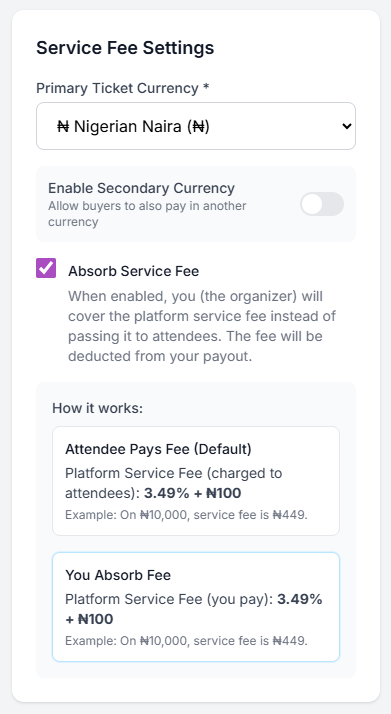
Here is the important part: you get to choose who pays the service fee.
By default, the service fee is added on top of the ticket price at checkout. So if you price a ticket at N5,000, the attendee sees N5,000 plus the service fee at checkout and pays the total.
But if you toggle on the "Absorb Service Fee" option when creating your event, the fee comes out of your revenue instead. The attendee sees and pays exactly N5,000, and TikkBay deducts the fee from your payout. This gives your attendees a clean, round price and makes your event look more professional.
Many organizers running premium events prefer to absorb the fee. It is a small cost that makes a big difference in the buyer experience.
Setting Up Your Payout Account
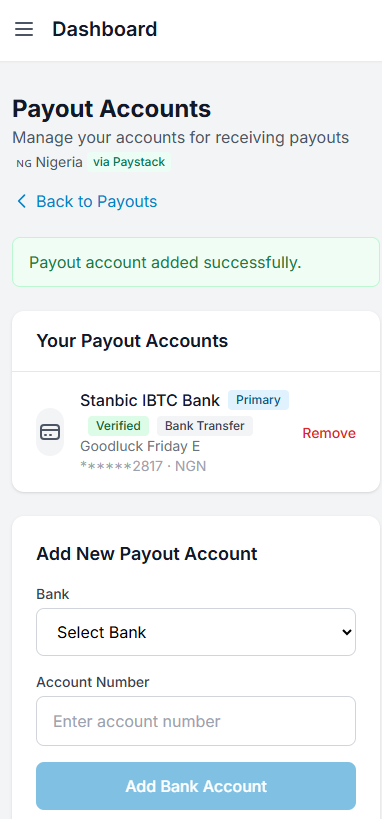
Before you can receive payouts, you need to add a payout account. This is the bank account or mobile money wallet where TikkBay sends your earnings.
Bank Account Setup
Go to your organizer dashboard, navigate to Payouts, and click Accounts. Click to add a new bank account and provide your account number and select your bank from the dropdown list.
For Nigerian organizers, TikkBay verifies your account instantly through Paystack. When you enter your account number and select your bank, TikkBay contacts Paystack to resolve the account. Your account holder name appears automatically. This confirms that the account is valid and belongs to the right person.
For organizers in other African countries, TikkBay verifies through Flutterwave. If the verification succeeds, your account is marked as verified immediately. If Flutterwave cannot verify the account for your country (some countries have limited verification support), the account is still added and will be verified when your first payout is processed.
Mobile Money Setup
If you are in a country that supports mobile money (Ghana, Kenya, Uganda, Tanzania, Rwanda, Zambia, Cameroon, Senegal, Malawi, or Sierra Leone), you can add a mobile money wallet as your payout account instead of a bank account.
Provide your mobile number, select your mobile money network (such as M-Pesa in Kenya or MTN Mobile Money in Ghana), and enter your account name. Mobile money accounts are verified instantly.
Primary Account
You can have multiple payout accounts, but one must be set as your primary account. This is where all your payouts go. You can switch your primary account at any time. You cannot delete your primary account if you have other accounts on file without first setting one of the others as primary.
How Your Payout Is Calculated
When a payout is generated, TikkBay calculates your earnings like this:
Gross amount is the total value of all confirmed ticket sales in the payout period. This is everything your attendees paid.
Platform fee is TikkBay's service fee, which was calculated at the time of each sale. If you chose to absorb the fee, it was included in the gross amount. If the attendee paid it, it was collected on top of your ticket price.
Gateway transfer fee is a small percentage charged by the payment gateway (Paystack or Flutterwave) to transfer the money to your bank account or mobile money wallet.
Net amount is what you receive. It equals the gross amount minus the platform fee minus the gateway transfer fee. This is the exact amount that lands in your account.
TikkBay shows all of these numbers on every payout in your dashboard, so you always know exactly how your earnings were calculated. There are no hidden deductions or surprise charges.
Minimum Payout Threshold
Each country has a minimum payout amount. For Nigeria, it is N1,000. If your net earnings for a payout period are below this threshold, the payout is held and rolled over to the next period. This prevents tiny transfers that would cost more in fees than they are worth.
The minimum varies by country to account for currency differences. Your dashboard always shows your country's minimum so you know what to expect.
Choosing Your Payout Schedule
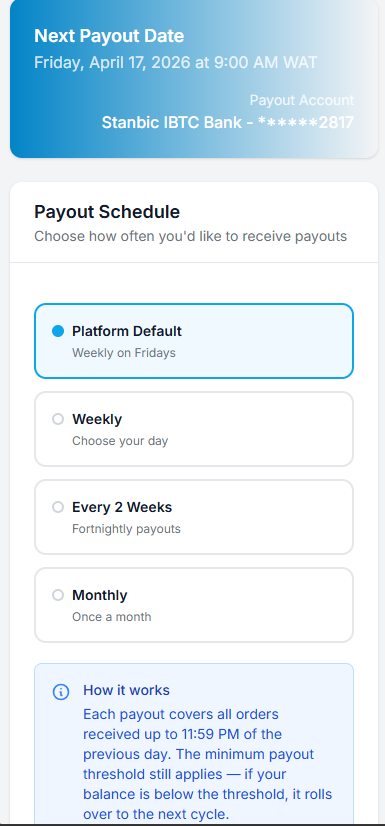
TikkBay gives you control over when you get paid. You can choose from four payout schedule options.
Platform Default (Weekly)
This is the default for all new organizers. TikkBay processes payouts every week. The system collects all your confirmed orders from the previous week and sends your earnings on the scheduled payout day. For the default schedule, this is typically every Friday.
Weekly (Custom Day)
If you want weekly payouts but on a different day, you can set a custom weekly schedule. Choose any day of the week, such as Monday or Wednesday, and TikkBay will process your payout on that day every week.
Every Two Weeks
Payouts are processed every other week on your chosen day. This can be useful if you prefer fewer, larger payouts.
Monthly
Payouts are processed once a month on a specific day you choose (between the 1st and the 28th). Some organizers prefer monthly payouts for simpler bookkeeping.
To change your schedule, go to Payouts in your organizer dashboard and update your payout schedule. Your next payout date is always visible on the payout summary page so you know exactly when to expect your money.
Your Payout Dashboard
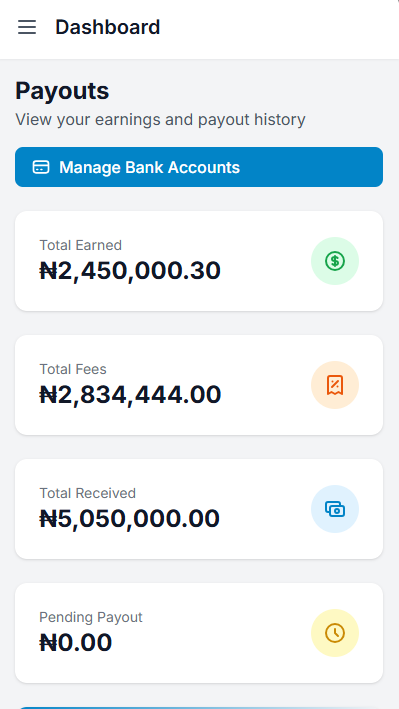
Your payout dashboard gives you a complete picture of your earnings at a glance.
Total Earned shows the gross amount across all your completed payouts. This is the total value of all ticket sales that have been paid out.
Total Fees shows the combined platform fees and gateway transfer fees deducted across all your payouts.
Total Received shows the net amount that has actually been sent to your bank account or mobile money wallet.
Pending Amount shows earnings that are confirmed but have not yet been paid out. These are sales waiting for your next payout date.
Next Payout Date shows exactly when your next payout will be processed based on your schedule.
Below the summary, you see a full history of every payout with the date, amount, status, and a link to view the detailed breakdown. Clicking into a payout shows you every order that was included in that batch, along with the gross amount, fees, and net amount for each.
KYC Verification
TikkBay may request Know Your Customer (KYC) documents from organizers. This is a standard verification process that helps protect both you and your attendees. You may be asked to upload identification documents through your organizer dashboard.
KYC verification does not block you from creating events or selling tickets. Your organizer account is active from the moment you register. However, having your KYC verified builds trust and ensures smooth payout processing.
You can find the KYC section in your organizer dashboard. If verification is requested, you will see a prompt to upload the required documents.
What Happens with Refunds?
If you need to refund a ticket, the refunded amount is deducted from your next payout. TikkBay handles the refund processing back to the attendee through the original payment method. You do not need to send money back manually.
Frequently Asked Questions
Can I get paid before my event happens? Yes. Payouts are based on confirmed ticket sales, not event dates. If someone buys a ticket today and your payout schedule triggers tomorrow, that sale is included in the payout.
What if I have not added a payout account yet? Your earnings are tracked and held safely. Once you add and verify a payout account, your accumulated earnings will be included in your next scheduled payout. TikkBay also notifies you if a payout could not be processed because of a missing account.
Can I receive payouts in a different currency? Payouts are sent in your local currency based on your country. If your organizer account is registered in Ghana, you receive payouts in Ghanaian Cedis. If you are in Kenya, you receive Kenyan Shillings.
Is there a maximum payout amount? There is no maximum. Whether you sell N50,000 or N50,000,000 worth of tickets, TikkBay pays you the full amount minus fees.
Can I see which orders are included in each payout? Yes. Click into any payout on your dashboard and you will see a detailed list of every order, the event it belongs to, the amount, and how the fees were calculated.
Quick Checklist: Getting Your Payouts Set Up
Ready to Start Earning from Your Events?
The whole point of selling tickets is to earn revenue. TikkBay makes sure that revenue reaches you quickly, transparently, and reliably, whether you are in Lagos, Accra, Nairobi, or Johannesburg.
No chasing payments. No mysterious deductions. No waiting months to get your money. Just clear fees, flexible schedules, and direct deposits to your account.
Head over to tikkbay.com, set up your payout account, and start selling tickets with the confidence that your money will be there when you need it.
And if you have not created your first event yet, check out our guide on How to Create Your First Event on TikkBay and Start Selling Tickets in 10 Minutes.


A global event discovery and ticketing platform. Find something worth dressing up for.

Choose whether to allow optional cookies for analytics, personalisation and marketing. Read our Privacy Policy.
TikkBay Support
Usually responds instantly
Create a Support Ticket
Powered by Plusky IT Solutions
Need help? We're here!
Ask about tickets, events, payouts, and more. Click to chat.